
Introduction
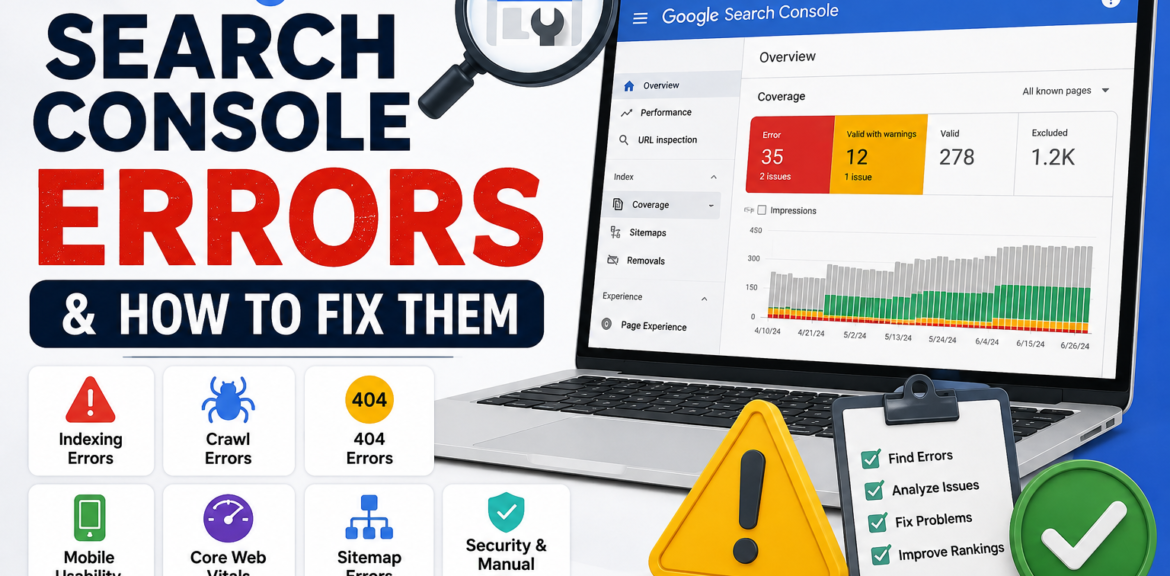
Google Search Console (GSC) is one of the most powerful free SEO tools available for website owners, bloggers, and digital marketers. It helps you monitor your website’s performance in Google Search, identify technical SEO issues, and understand how Google crawls and indexes your pages. However, many website owners ignore the warnings and errors reported in Search Console, which can lead to poor rankings, reduced organic traffic, and indexing problems.
If your website isn’t appearing in Google search results or you’re experiencing a sudden drop in traffic, Google Search Console should be the first place you check. The platform provides valuable insights into indexing issues, crawl errors, mobile usability problems, Core Web Vitals, and security concerns.
In this guide, we’ll explain the most common Google Search Console errors, why they matter, and how to fix them to improve your website’s SEO performance.
What Is Google Search Console?
Google Search Console is a free tool provided by Google that helps website owners monitor and maintain their site’s presence in Google Search. It allows you to track keyword performance, submit sitemaps, inspect URLs, identify indexing issues, and fix technical SEO problems.
Some of its key features include:
- Monitoring website performance in Google Search
- Checking indexed and non-indexed pages
- Finding crawl and indexing errors
- Submitting XML sitemaps
- Inspecting individual URLs
- Monitoring Core Web Vitals
- Detecting mobile usability issues
- Identifying security and manual action warnings
Regularly reviewing your Search Console reports helps keep your website healthy and search-engine friendly.
Why Google Search Console Errors Matter
Ignoring Search Console errors can negatively impact your website’s visibility. If Google cannot crawl or index your pages properly, those pages may never appear in search results.
Common consequences include:
- Lower keyword rankings
- Reduced organic traffic
- Poor indexing
- Slow discovery of new content
- Negative user experience
- Lost business opportunities
Fixing these issues ensures search engines can understand and rank your website correctly.
1. Page Isn’t Indexed
Why It Happens
One of the most common reports in Search Console is that a page has not been indexed. This means Google knows about the page but has decided not to include it in its search index.
Possible reasons include:
- Thin or low-quality content
- Duplicate pages
- Incorrect robots.txt rules
- Noindex meta tag
- Canonical pointing elsewhere
- Recently published page
How to Fix It
- Make sure the page contains unique, valuable content.
- Check that there is no noindex tag.
- Verify the canonical URL points to the correct page.
- Add internal links from relevant pages.
- Submit the page using the URL Inspection Tool and request indexing.
2. Crawled – Currently Not Indexed
Why It Happens
This status means Google successfully crawled your page but chose not to index it. It often occurs when Google believes the content doesn’t provide enough value compared to other pages.
How to Fix It
Improve the page by:
- Expanding the content.
- Adding unique insights.
- Improving formatting and readability.
- Including helpful images.
- Adding FAQs.
- Strengthening internal links.
Once updated, request indexing again.
3. Discovered – Currently Not Indexed
Why It Happens
Google knows the page exists but hasn’t crawled it yet. This usually happens on large websites or when Google’s crawl budget is limited.
How to Fix It
- Improve your website’s internal linking.
- Submit an updated XML sitemap.
- Remove unnecessary low-quality pages.
- Improve website speed.
- Build quality backlinks to important pages.
Google will usually crawl the page during future visits.
4. Submitted URL Has Crawl Issue
Why It Happens
Google attempted to crawl the submitted URL but encountered a technical problem.
Possible causes include:
- Server errors
- Redirect loops
- Broken pages
- Timeout issues
- DNS problems
How to Fix It
- Check your hosting server.
- Ensure the page returns a 200 OK status.
- Remove broken redirects.
- Fix server configuration errors.
- Test the URL using the URL Inspection Tool.
5. 404 Not Found Errors
Why It Happens
A 404 error occurs when a requested page no longer exists.
Although occasional 404 pages are normal, too many broken URLs create a poor user experience.
How to Fix It
- Restore deleted pages if needed.
- Redirect old URLs to relevant new pages using a 301 redirect.
- Update internal links pointing to deleted pages.
- Remove outdated sitemap entries.
Avoid redirecting every broken page to your homepage, as this can confuse users and search engines.
6. Duplicate Without User-Selected Canonical
Why It Happens
Google has found duplicate versions of your content and selected a different canonical page than the one you expected.
This often occurs due to:
- URL parameters
- HTTP and HTTPS versions
- WWW and non-WWW versions
- Duplicate product pages
How to Fix It
- Use proper canonical tags.
- Redirect duplicate URLs.
- Maintain a consistent URL structure.
- Update internal links to the preferred version.
7. Mobile Usability Issues
Why It Happens
Google primarily uses mobile-first indexing, meaning it evaluates the mobile version of your website first.
Common issues include:
- Text too small
- Clickable elements too close together
- Content wider than the screen
- Viewport configuration problems
How to Fix It
- Use a responsive website design.
- Test your website on different mobile devices.
- Increase font sizes.
- Improve button spacing.
- Avoid horizontal scrolling.
A mobile-friendly website improves both user experience and rankings.
8. Core Web Vitals Problems
Why It Happens
Core Web Vitals measure loading performance, responsiveness, and visual stability.
Common metrics include:
- Largest Contentful Paint (LCP)
- Interaction to Next Paint (INP)
- Cumulative Layout Shift (CLS)
Poor scores can negatively impact SEO and user satisfaction.
How to Fix It
- Compress images.
- Reduce JavaScript execution.
- Enable browser caching.
- Improve server response time.
- Reserve space for images and ads to prevent layout shifts.
- Use lazy loading where appropriate.
9. XML Sitemap Errors
Why It Happens
Your sitemap helps Google discover important pages. Errors occur when:
- URLs return 404 errors.
- Blocked pages are included.
- Non-canonical pages are submitted.
- Sitemap isn’t updated.
How to Fix It
- Submit only indexable pages.
- Remove deleted URLs.
- Regenerate the sitemap after major changes.
- Keep the sitemap updated automatically.
10. Security Issues and Manual Actions
Why It Happens
Google may detect malware, hacked content, spam, or unnatural backlink practices. Manual actions are applied when your website violates Google’s spam policies.
How to Fix It
- Remove malicious code.
- Delete spam pages.
- Clean unnatural backlinks where possible.
- Secure your website with HTTPS.
- Update plugins, themes, and CMS software.
- After resolving the issue, submit a reconsideration request if a manual action was applied.
Best Practices for Using Google Search Console
To keep your website healthy, make it a habit to:
- Check Search Console at least once a week.
- Monitor indexing reports regularly.
- Submit updated XML sitemaps.
- Inspect important URLs after publishing.
- Review keyword performance.
- Fix crawl errors promptly.
- Monitor Core Web Vitals.
- Improve pages with declining impressions or clicks.
Consistent monitoring helps identify problems before they impact your rankings.
Frequently Asked Questions
How often should I check Google Search Console?
Checking your account at least once a week is recommended. If you frequently publish new content or manage a large website, reviewing it every few days can help you catch issues early.
Why are my pages discovered but not indexed?
This usually means Google knows the page exists but hasn’t crawled it yet, or it doesn’t consider the page valuable enough to index. Improving content quality and internal linking often helps.
Are 404 errors bad for SEO?
A few 404 errors are normal and won’t hurt your website. However, many broken pages can create a poor user experience and waste crawl budget, so they should be fixed or redirected when appropriate.
Does fixing Search Console errors improve rankings?
Fixing technical issues helps Google crawl and index your website more efficiently. While resolving errors doesn’t guarantee higher rankings, it removes obstacles that can prevent your content from performing well in search results.
Final Thoughts
Google Search Console is more than just a reporting tool—it’s an essential part of every successful SEO strategy. By regularly monitoring indexing reports, crawl errors, Core Web Vitals, mobile usability, and security issues, you can identify problems before they affect your rankings.
Don’t ignore warnings simply because your website appears to be working. Small technical issues can gradually reduce your visibility in search results over time. Make it a habit to review Search Console, fix reported errors, and keep your website optimized for both users and search engines.
A technically healthy website, combined with high-quality content and strong SEO practices, gives you the best chance of achieving higher rankings, more organic traffic, and long-term online success.